Friday, March 4, 2022

SwiftUI Search & Filter with Combine - Part 3 (iOS, Xcode 13, SwiftUI, 2...

In part 3 of the Searchable video series, I show you how to use Combine in #SwiftUI for the search and filter logic connected to the searchable modifier.

⭐️(Plus you get a quick refresher on the 3 parts of every Combine pipeline.)
Thursday, February 24, 2022

SwiftUI Search Bar: Searchable Modifier - Part 1 (iOS, Xcode 13, 2022)

Apple's search pattern is different than its filtering pattern.
This video shows you how to implement the search pattern using SwiftUI's searchable modifier.

Note: Search and Filter have two different implementations of searchable. 

This first part covers searching:

SwiftUI Filtering with the Searchable Modifier - Part 2

How you do filtering using the SwiftUI searchable modifier is implemented differently than doing search.

Two different things. (Filtering is easier, IMO.)

Check out Part 2 of the SwiftUI searchable series:

Tuesday, August 10, 2021

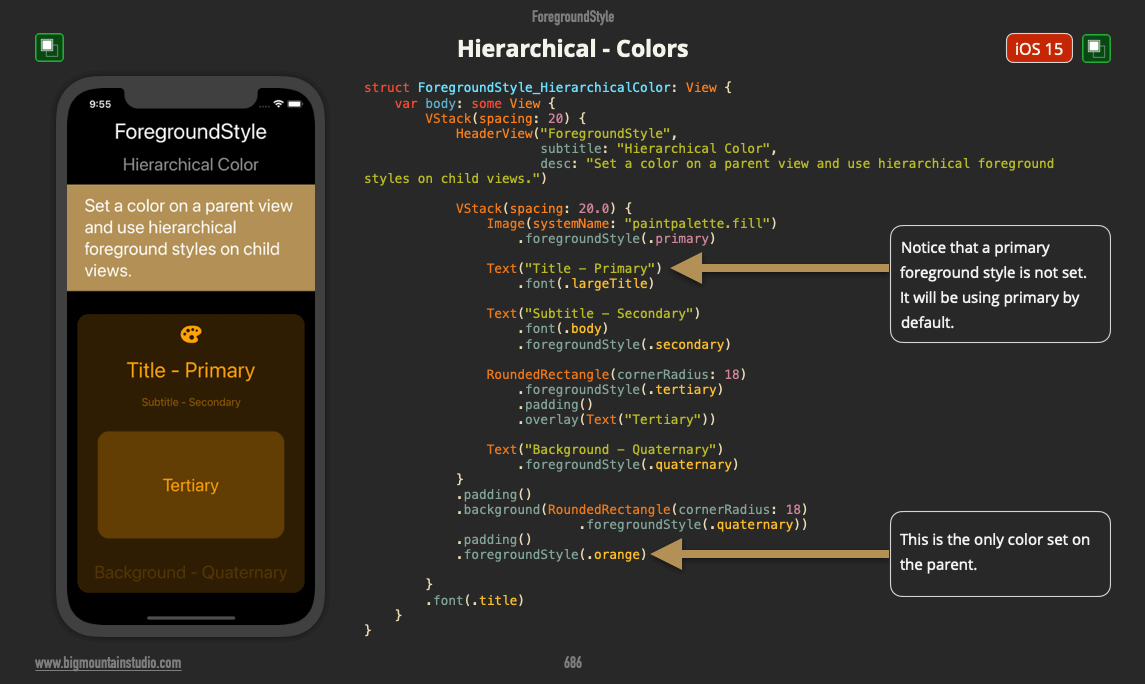
How to Use Hierarchical Styles in SwiftUI with Colors


SwiftUI has 5 different style categories. Hierarchical styles are one of the categories. They can be used with or without color.

Without color these hierarchical styles use variables of black and white (for light and dark modes). You have seen this with the default text, SF Symbol and Shape colors. They use the primary hierarchical style.

Well, you can also use variations of color, not just black and white.

Start by adding a color to the parent view using:
.foregroundStyle(Color.orange)

Then when you use one of these hierarchical styles, they will use a variation of that color:


  • .primary

  • .secondary

  • .tertiary

  • .quaternary


Take a look at the example:


foregroundstyle.hierarchical.colors.png

Monday, August 9, 2021

How do you use Hierarchical styles in SwiftUI?

In SwiftUI, starting with Xcode 13, you can now apply hierarchical styles to your UI.

These styles are meant to show importance to different levels of your UI by making them stand out more or by showing levels of depth.

You probably do this already in some way. You give UI views in the background less color or more transparency and UI views in the foreground have more opacity (solidity) and might use more color.

And finally, you have your accent color which stands out the most so users know that they can interact with these UI views, like buttons.

Now, you can use hierarchical styles to help you with this pattern.

There are 4 styles at this time:

  1. Primary - More in the foreground
  2. Secondary
  3. Tertiary
  4. Quaternary - More in the background

You apply these styles to views using modifiers such as:
  • background
  • foregroundStyle

Take a look at the image for example:
 
foreground.hierarchical.png

Note: These examples come from a book called SwiftUI Views Mastery which is a picture book reference of SwiftUI views and code that’s almost 1,000 pages.

Interested in beginning SwiftUI?

Start with the free SwiftUI Views Quick Start picture book!
Wednesday, August 4, 2021

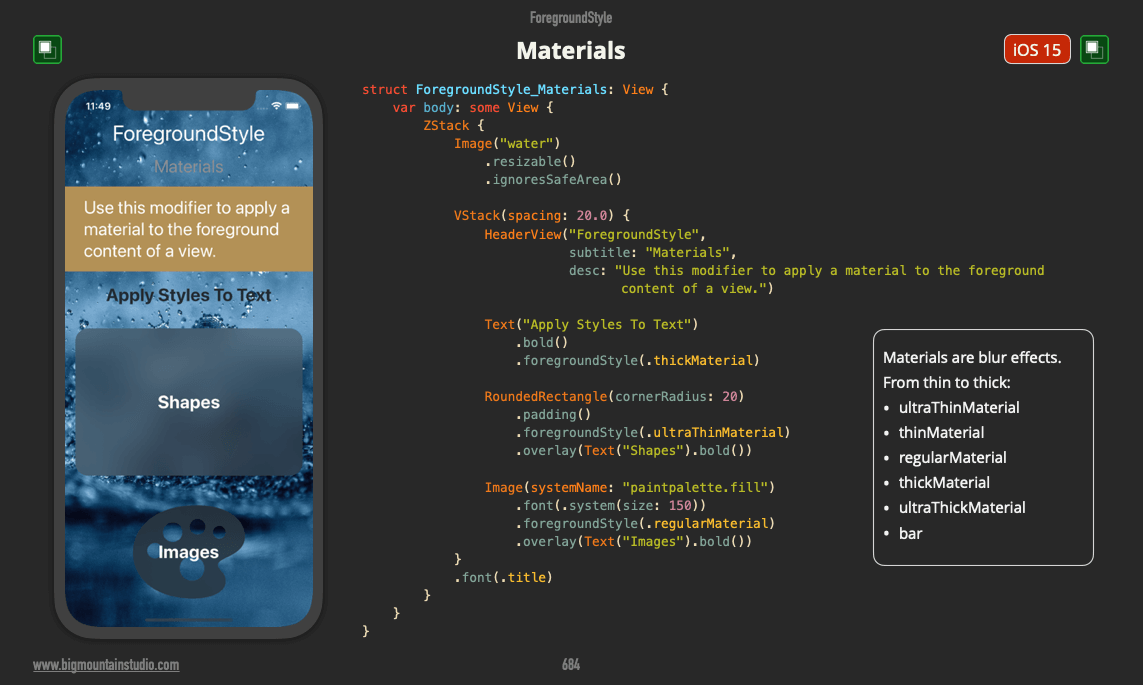
How do you use foregroundStyle or background to add blur effects in SwiftUI?

In Xcode 13 you now have access to a variety of blur effects also known as "materials".

Materials are one of the 5 categories of styles that can be applied to views using modifiers such as foregroundStyle and background.

The 5 SwiftUI Styles Categories include:

  1. Color

  2. Gradients

  3. Materials

  4. Hierarchal

  5. Semantic


When you apply a material to a view, you have a choice in how transparent and blurred the view is.

Here are 6 materials available to you:

  1. ultraThinMaterial

  2. thinMaterial

  3. regularMaterial

  4. thickMaterial

  5. ultraThickMaterial

  6. bar


Here are some examples of how to apply these materials to different views:

Text("Apply Styles To Text")
    .bold()
    .foregroundStyle(.thickMaterial)

RoundedRectangle(cornerRadius: 20)
    .padding()
    .foregroundStyle(.ultraThinMaterial)
    .overlay(Text("Shapes").bold())

Image(systemName: "paintpalette.fill")
    .font(.system(size: 150))
    .foregroundStyle(.regularMaterial)
    .overlay(Text("Images").bold())

Are you new to SwiftUI?
Go here to get a free SwiftUI Views Quick Start book.


foreground.materials.png
Note: These examples come from a book called SwiftUI Views Mastery which is a picture book reference of SwiftUI views and code that’s almost 1,000 pages.

Interested in beginning SwiftUI?

Start with the free SwiftUI Views Quick Start picture book!

Tuesday, August 3, 2021

How do use foregroundStyle to apply gradients to SwiftUI views?

In SwiftUI (Xcode 13) you can use the foregroundStyle modifier to apply gradients to views such as Text, Images, and Shapes.


RoundedRectangle(cornerRadius: 20)
    .foregroundStyle(.conicGradient(colors: [.green, .blue], 
                                    center: .center))


In this image, you can see foregroundStyle being used to apply the new conicGradient.

The conic gradient is a lot like angularGradient. 

What's different is you can adjust the angle with just one parameter.

Check it out:

conic.gradient.intro.png

conic.gradient.angle.png
Note: These examples come from a book called SwiftUI Views Mastery which is a picture book reference of SwiftUI views and code that’s almost 1,000 pages.

Interested in beginning SwiftUI?

Start with the free SwiftUI Views Quick Start picture book!

Monday, August 2, 2021

What new colors are available in SwiftUI in iOS 15?

With the release of Xcode 13, we see that some new colors are now a part of SwiftUI.

These colors were previously a part of UIKit but were not native to SwiftUI yet.

The colors are:

  1. Mint

  2. Teal

  3. Cyan

  4. Indigo

  5. Brown


So what do you think? See any colors you will be using?

Get your free SwiftUI Views Quick Start book.


color.new.png
Note: These examples come from a book called SwiftUI Views Mastery which is a picture book reference of SwiftUI views and code that’s almost 1,000 pages.

Interested in beginning SwiftUI?

Start with the free SwiftUI Views Quick Start picture book!

Wednesday, July 28, 2021

How do you create a 2-way binding with controls in a SwiftUI list?

In iOS 15 you can use SwiftUI to bind controls in a list directly to your data source.

This means you can edit data in the list rows and your data source will get updated automatically.

It's all about the dollar signs ($).

Look at the image to see where exactly you need to add them:


2.way.binding.in.list.png
Note: These examples come from a book called SwiftUI Views Mastery which is a picture book reference of SwiftUI views and code that’s almost 1,000 pages.

Interested in beginning SwiftUI?

Start with the free SwiftUI Views Quick Start picture book!

Tuesday, July 27, 2021

How to make safeAreaInset work on Lists?

In SwiftUI in iOS15 you can use the safeAreaInset modifier to overlay another view that goes into the safe area like you see here.

This could be a bug but the last row of a List doesn't come up above it.

👉 The Fix: Change the List to a ScrollView.


safeareainset.in.list.png

safeareainset.png
Note: These examples come from a book called SwiftUI Views Mastery which is a picture book reference of SwiftUI views and code that’s almost 1,000 pages.

Interested in beginning SwiftUI?

Start with the free SwiftUI Views Quick Start picture book!

Sunday, July 25, 2021

How do you create a menu using a Picker in SwiftUI?

In SwiftUI (iOS 14+), you can apply the .pickerStyle(.menu) modifier to a Picker view to make it look like a menu when the user taps on the selected picker item button:

picker.menu.png
Note: These examples come from a book called SwiftUI Views Mastery which is a picture book reference of SwiftUI views and code that’s almost 1,000 pages.

Interested in beginning SwiftUI?

Start with the free SwiftUI Views Quick Start picture book!

Monday, July 19, 2021

How the 6 different SwiftUI list styles show section headers and footers


The 6 different #SwiftUI list styles in #iOS will actually present your section headers and footers differently.

Does anyone else see a footer that looks out of place? 🤔

liststyles.header.footer.png
Note: These examples come from a book called SwiftUI Views Mastery which is a picture book reference of SwiftUI views and code that’s almost 1,000 pages.

Interested in beginning SwiftUI?

Start with the free SwiftUI Views Quick Start picture book!

Sunday, July 18, 2021

What listStyle options are there for the List view in SwiftUI?

Here are 6 different list styles in #SwiftUI for #iOS.

I really wish iOS also got the alternate row backgrounds like macOS did.

Originally, I had all of these styles on separate pages. But when referring to them I found I was doing a lot of page flipping. This will help.


liststyles.png
Note: These examples come from a book called SwiftUI Views Mastery which is a picture book reference of SwiftUI views and code that’s almost 1,000 pages.

Interested in beginning SwiftUI?

Start with the free SwiftUI Views Quick Start picture book!

Thursday, July 1, 2021

Onboarding - SwiftUI Conditional Navigation and Transition Animation

Can you navigate to another view in #SwiftUI WITHOUT the NavigationLink?

Yes! Here's one way:

Onboarding - SwiftUI Conditional Navigation and Transition Animations

Thursday, November 5, 2020

SwiftUI Animations - 3 Simple Techniques (ft. Mark Moeykens)


It was so much fun creating this video with Chris's project! I love the ease and simplicity of #SwiftUI animations. 

I love Chris's work and his teaching style and highly recommend his YouTube channel and courses. https://youtube.com/codewithchris

Saturday, October 31, 2020

Can You Use SwiftUI In UIKit Projects?

 Were you a little sad when SwiftUI first came out because you couldn't adopt it at work yet?

Maybe because it was too new or because you had a UIKit application or there were no new app projects coming up to use it?

You no longer have to wait!

- You don't have to create a whole new project just to start using SwiftUI.
- You don't have to think up a whole new app so you have an excuse to use SwiftUI!
- And SwiftUI is more mature than it ever has been to use in production.

You can start using SwiftUI right now in your existing UIKit applications!

Whether at work or for a personal project, you can learn some of the lesser-known tools Apple gave us with the release of SwiftUI.

UIKit 🤝 SwiftUI

It was funny to me that Apple hadn't talked more about these tools when SwiftUI first came out. These tools are the bridge from UIKit to SwiftUI. Yet most of their presentations are just about showing SwiftUI by itself.

This made me and many other developers think we had to use SwiftUI only in a NEW app/project.

Allow me to break that myth

You don't need a separate project just for SwiftUI. And if you've been holding off from really getting into SwiftUI because you were going to rewrite an app or create a brand new app then wait no more!

I created a course to walk you through how you can start using SwiftUI in your UIKit apps. I answer some of the most frequent questions developers have, such as:

- How can I leverage my UIKit knowledge toward SwiftUI?
- How can I add SwiftUI to my UIKit project?
- Can I pass data from a UIViewController a SwiftUI view and back?
- What are Property Wrappers and how do they work?
- Can SwiftUI be used to create complex UIs?
- Can you create Table Views in SwiftUI?
- How can I create Collection Views with SwiftUI?
- What if SwiftUI does not have a UIKit equivalent?

SwiftUI Weekend Kickstarter Course

This introductory course will answer all of these questions and walk you through how to do all of these things inside a UIKit project.
It's a weekend course because you will be able to finish it in one day and not have to devote a whole week just to complete it. 

You will be up and running as fast as possible!

Reference Guide

I also added a quick reference guide to all the important pieces of code you'll need to quickly start integrating SwiftUI within your UIKit projects.

So imagine being able to go into work tomorrow knowing you can now use SwiftUI in the UIKit project you have been developing and supporting.

Your next screen in your UIKit project can be built in SwiftUI.

Make work exciting again and learn these tools!

Summary

So yes, you can mix SwiftUI with UIKit.

Get this course today to start learning how!

Friday, July 24, 2020

How do I change the visual representation of the DatePicker?


In the new #SwiftUI 2.0, you have different options for how you want to display the DatePicker. Here are two options where you can use a calendar view or use the wheeled version. There are more options available than just these two though.

If you are interested in learning SwiftUI, I have an immersion bundle with a eBook that has embedded video examples, screenshots on every page with code, study guide, flash cards and the complete project with over 400 SwiftUI files. the book alone is almost 750 pages. All for 40% OFF during the SwiftUI Summer Sale. Take advantage of it now! https://bit.ly/2CVa7n4 


datepickerstyle.png

Path functions in SwiftUI


In the new SwiftUI Views Mastery book I have expanded the Path section with all available path functions. I was a little intimidated at first with creating custom shapes but now I have a lot of fun creating them! They are super useful and versatile.


pathfunctions.png

Wednesday, July 22, 2020

Can I change the background color of a SwiftUI GroupBox?

Someone asked me earlier if we can change the GroupBox background color in #SwiftUI.

I couldn’t change it directly but I was able to change it by creating a custom GroupBoxStyle.


This is from the chapter Custom Styling in the SwiftUI Views Mastery book.

Check out the FREE book: https://www.bigmountainstudio.com/free-swiftui-book

Monday, July 20, 2020

Where can I used Pinned Views in SwiftUI 2.0?

In SwiftUI 2.0 you can use pinned views for anything with the word "Lazy" in it. 😃 

That's an easy way to remember (LazyVStack, LazyHStack, LazyVGrid, LazyHGrid).


Join hundreds of other devs and learn SwiftUI this Summer and get 40% OFF the SwiftUI View Mastery Bundle: https://www.bigmountainstudio.com/swiftui-views-book?coupon=SUMMER_BOOK_SALE

Only until August 3rd, 2020

SwiftUI Search & Filter with Combine - Part 3 (iOS, Xcode 13, SwiftUI, 2...

In part 3 of the Searchable video series, I show you how to use Combine in #SwiftUI for the search and filter logic connected to the searcha...
